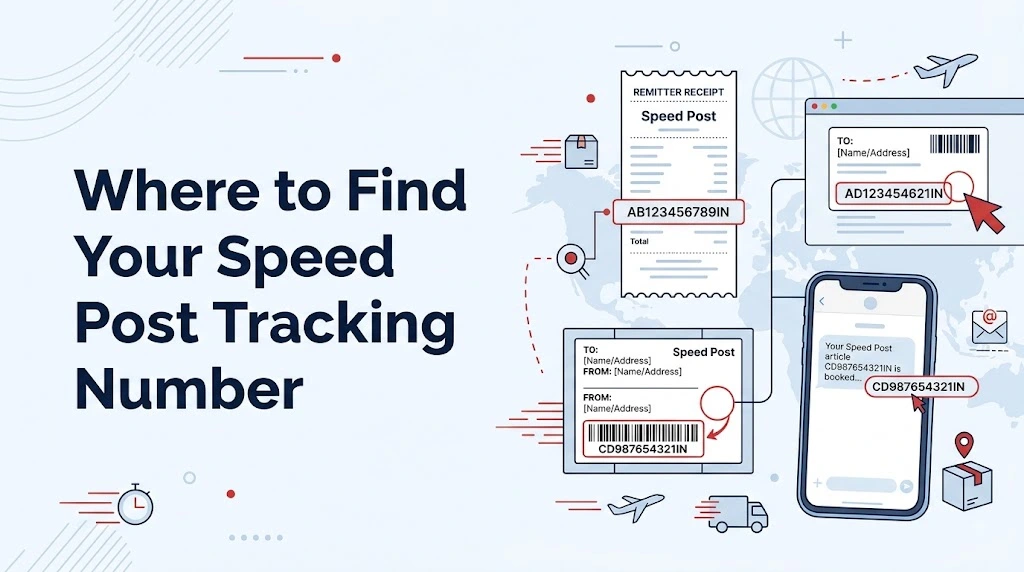
When you send or receive a Speed Post article, one of the first things you may need is the tracking number. India Post’s official tracking service uses this number to identify the consignment and show the available tracking information for it. On the India Post website, this is referred to as a Consignment Number and is entered in the official “Track and Trace” service.
The confusing part is that many people know it simply as a “tracking number,” while India Post may display the term Consignment Number. So, when you are looking for your speed post tracking number, you are essentially looking for the number connected with your Speed Post booking.
The good news is that you usually do not need to guess where it is. In most cases, the number is available from the documents, receipt, message, or information provided when the article was booked.
What Is a Speed Post Tracking Number?
A Speed Post tracking number is the number used to identify a particular postal consignment in India Post’s tracking system.
India Post’s current official website provides a Track and Trace service where users can enter a Consignment Number and search for the available tracking information. The same official interface also separately provides options such as Article Number, Reference Number, Money Order and Complaint ID, so it is useful to enter the number in the correct tracking field.
In simple terms, think of it as the identification number attached to your Speed Post article. When you have the correct number, you can use it to check whether tracking information is available for the shipment.
Where Can You Find Your Speed Post Tracking Number?
The easiest place to look depends on how the Speed Post article was booked.
1. Check the Speed Post booking receipt
Start with the receipt you received when the article was booked at the post office.
The receipt contains the details associated with the booking, and the number you need for tracking should be identifiable from the booking information. Look for wording such as Consignment Number, Article Number, or similar tracking-related information.
This is usually the first place worth checking because the number is provided as part of the booking process.
Do not throw away the receipt immediately after sending a Speed Post item. Keeping it until the article is delivered can save you a lot of trouble later, especially when you want to check the status again.
2. Look at the information given by the sender
If someone else sent the Speed Post article to you, you may not have the original post-office receipt.
In that situation, contact the sender and ask for the tracking or consignment number.
For example, suppose a family member sends you an important document through Speed Post. You may know that the document has been booked, but you may not have the booking receipt. The sender can check the booking information they received and share the number with you.
This is often much easier than trying to track a shipment without the required identification number.
3. Check SMS or other booking information you received
Depending on how the booking information was communicated, the tracking details may also be available in a message or other electronic information connected with the shipment.
When checking your phone, search for messages related to India Post, Speed Post, the postal booking, or the shipment itself.
It is also worth checking the original message rather than relying on memory. Tracking numbers can be long enough to be copied incorrectly, and even one incorrect character can prevent a tracking search from working properly.
4. Check the shipping details from the sender or online seller
If your Speed Post item is connected with an online purchase, application, document submission, or another service, the sender may have provided shipment details separately.
For example, an organization may tell you that your documents have been dispatched through Speed Post and provide the relevant consignment information.
In that situation, use the number supplied with the dispatch information rather than trying random numbers from the order or application.
This distinction matters because an order number, application number, customer ID, or reference number is not automatically the same thing as the postal consignment number.
How to Use the Number for Speed Post Tracking
Once you have the number, the next step is straightforward.
Go to the official India Post website and open its Track and Trace service. The current India Post tracking interface includes a field specifically labelled Consignment Number where the tracking number can be entered.
Enter the number carefully and complete the tracking process shown on the official website.
It is important to use the official tracking field instead of entering the number into an unrelated service. India Post’s website currently identifies its tracking area as Track ‘N’ Trace and provides a dedicated Consignment Number option.
You can also use a tracking tool such as the one on this website to make the process easier, but the underlying shipment information comes from the postal tracking system. For the authoritative source, India Post’s official Track and Trace service remains the reference point.
I Found Several Numbers on My Receipt. Which One Should I Use?
This is a common source of confusion.
A postal receipt can contain different pieces of information. India Post’s official tracking interface itself shows separate tracking options for Consignment ID, Money Order, and Complaint ID, along with fields for Article Number and Reference Number.
So, do not automatically assume that every number printed on the receipt is your Speed Post tracking number.
Look specifically for the number associated with the consignment or article being tracked.
If you are still unsure, compare the number with the shipping details supplied by the sender or ask the post office where the item was booked.
What If Your Tracking Number Is Not Working?
There are several practical things to check before assuming that your shipment has a problem.
First, re-enter the number carefully. A single mistyped character can cause a tracking search to fail.
Second, make sure you are using the correct number. An order number, invoice number, application reference, or customer ID may not be the same as the postal consignment number.
Third, use the official India Post Track and Trace service and check that you are entering the number into the Consignment Number field.
If the number is correct but tracking information is not appearing, do not immediately assume the parcel has been lost. Tracking availability can depend on the postal system having the relevant consignment information available.
When the issue continues, keep your original booking receipt and shipment details available. Those details are useful when contacting the appropriate postal office or support channel.
Can You Track Speed Post Without the Tracking Number?
This is where expectations need to be realistic.
The official India Post tracking page asks users to enter a Consignment Number for the Track and Trace search.
That means that if you have completely lost the number, simply knowing the recipient’s name, address, or phone number should not be treated as a replacement for the consignment number on the normal tracking form.
Your best next step is to recover the number from the original source. Check the receipt, ask the sender, review the shipment information you were given, or contact the post office connected with the booking.
Trying random reference numbers usually creates more confusion rather than solving the problem.
Is the Tracking Number the Same as a Reference Number?
Not necessarily.
This is an important distinction because the official India Post Track and Trace interface shows Consignment Number and Reference Number as separate concepts in its tracking service.
So, if somebody gives you a reference number, do not automatically assume that it is the Speed Post consignment number.
Always check what the number is actually associated with before entering it into the tracking form.
A Simple Way to Remember Where Your Number Is
If you send Speed Post regularly, there is an easy habit that can save time.
After booking the article, keep a photo or digital copy of the receipt until delivery is confirmed. Also, if you are receiving a Speed Post shipment from somebody else, ask the sender for the consignment number as soon as the item is dispatched.
That way, when you need speed post tracking, you already have the most important detail ready.
You do not have to search through old messages or ask the sender again days later.
Final Takeaway
Finding your Speed Post tracking number is usually easier than it first appears. Start with the original booking receipt, then check any shipment message or dispatch information you received. If someone else sent the article, asking the sender for the consignment number is often the quickest solution.
Once you have the correct number, India Post provides an official Track and Trace service where you can enter the Consignment Number and check the shipment information available in its system.
The key is simply to use the right number. A reference number, order number, application number, or another identifier should not be treated as the Speed Post consignment number unless the sender or postal documentation confirms that it is.
For anyone who regularly sends important documents or parcels through India Post, keeping the original receipt until delivery is confirmed is one of the simplest habits to follow. It gives you the information you need when you want to check your shipment without having to start the search from scratch.